Drift Boss





Geometry Game
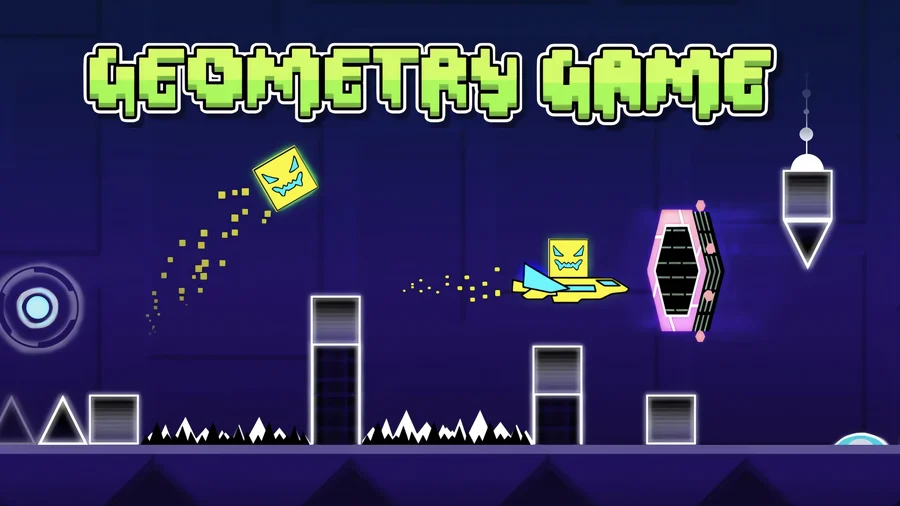
Geometry Game is a rhythm platformer in the style of Geometry Dash. You control a cube that runs forward on its own through a side-scrolling course, and your only job is to jump it over spikes and through gaps in time with the music.
It is free and runs in your browser with nothing to install. One mistake sends you back to the start of the level, which sounds harsh until you realize that is the whole point. This is a Scratch build made by Griffpatch, based on the original game by RobTop.
What is Geometry Game?
It is a 2D platformer where a square moves at a fixed pace and you tap to jump. The level scrolls automatically, so you are not steering left or right, you are reacting to what comes next. Hit a spike, a wall, or any hazard and you crash instantly and restart from the beginning. The music is not just background. Many of the jumps line up with the beat, so the song becomes a timing cue once you learn a level.
How to play
Keep your sound on. The cube handles its own forward movement, so you only deal with jumps and the occasional vehicle section.
Desktop controls
- Space or Up arrow to jump
- Hold Space or Up arrow to keep jumping when you can
- Up arrow to steer a vehicle up
- Down arrow to steer a vehicle down
- Avoid the spikes or you start the level over
Mobile controls
- Tap the screen to jump
- Hold to chain jumps where the level allows it
Reading the beat
Because the obstacles tend to land on the beat, you can hum along and let the rhythm tell you when to jump. This works better than staring at the spikes and reacting late. When a section trips you up over and over, slow down and listen for the pattern in the music before you try again.
Obstacles and gimmicks
Levels are more than spikes. They throw in portals, pads, and orbs that change how the cube behaves, so a stretch you cleared one way can flip on you.
Portals
Portals can flip gravity, change your speed, or switch you into a different vehicle mode. After one your inputs may feel reversed or faster than you expect, so the first few attempts through a portal section are mostly about figuring out the new rules.
Pads and orbs
Jump pads launch the cube on their own the moment you touch them. Orbs let you trigger a jump in mid-air, which opens up routes a normal jump cannot reach. These take the place of power-ups, and they keep levels from settling into one repeated motion.
Practice mode
Practice mode lets you drop checkpoints so you can learn a tricky stretch without replaying the whole level after every death. Break a hard level into smaller chunks, set a checkpoint before each rough spot, and repeat that piece until it feels automatic. Your hands learn the timing this way, and full runs get a lot easier once the segments are solid.
Tips for clearing a level
- Turn the sound on and sync your jumps to the beat instead of reacting to spikes
- Use practice mode to grind the one section that keeps killing you
- Treat portal sections as new rules and learn them slowly before going for a clean run
- Expect pads and orbs to change your trajectory, so do not jump on instinct right after one
- Try humming the song to lock in the rhythm of the harder parts
What makes it hard
There is one input and no margin. A single touch resets you, so the game is built on repetition until the level lives in your fingers. The difficulty is honest about it too, ranging from hard to nearly impossible. What keeps you going is that each restart teaches you the exact timing of the next jump, and the music makes the grind feel less like punishment.
Play Geometry Game on mobile
Geometry Game has a mobile app as well as the browser version. Keep playing here with no install, or get the app from Google Play and the App Store for a home-screen icon and touch controls built for phones and tablets.
Similar games
If you like Geometry Game, try these other free games on Drift Boss.
Geometry Game gameplay video