Drift Boss








PolyTrack
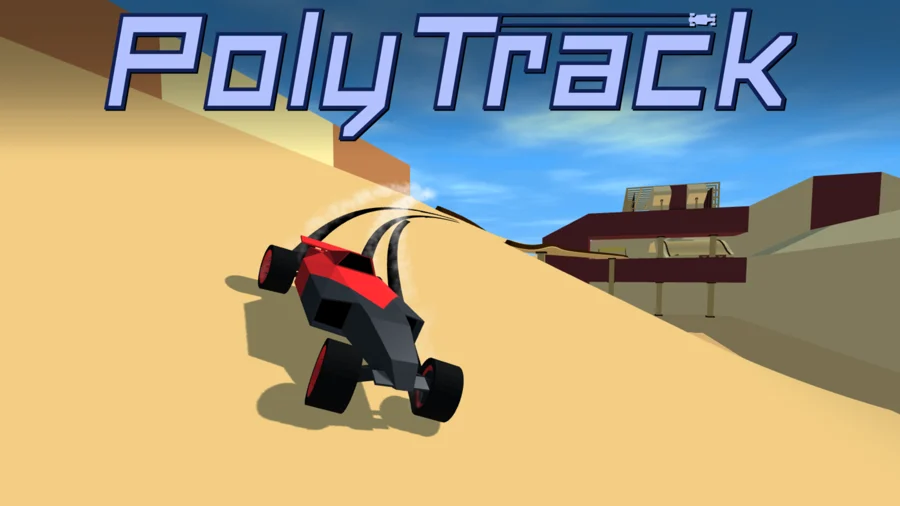
PolyTrack is a low-poly time-trial racer where the track is half the game. You drive a car you have customized around courses full of loops, ramps, and jumps, and you do it again and again to shave fractions of a second off your best lap.
It is free and runs in your browser, no download needed. The twist is the level editor: you can race the built-in tracks or build your own, then share them with everyone else.
What is PolyTrack?
PolyTrack is a fast 3D driving game built around the clock rather than a finish-line scramble against other cars. The loop is simple to describe and hard to put down. You pick a track, race it, see your time, and restart almost instantly to try a cleaner line. Inspiration from TrackMania shows in how much the racing rewards precision over raw speed. The car handling stays the same across every track. What changes is the layout and, for the official sets, the scenery.
How to play
Pick an existing track first if you are new, since building a good one takes practice. Drive it, learn the corners, then restart to chase a faster time.
Desktop controls
- WASD or the arrow keys to drive
- Enter or R to restart the run
Mobile controls
PolyTrack also runs on mobile browsers with on-screen touch steering, so you can play without a keyboard.
Editor controls
The level editor has its own set of inputs:
- Left-click to place a piece
- Right-click and move to pan the camera
- Middle-click and move to rotate the camera
- Scroll to zoom in and out
- Shift plus scroll, or Z and C, to raise and lower height
- Q and E to rotate the camera left and right
- R or Space to rotate the selected piece
- X to delete a piece
- T to test drive what you have built
Building a track
The editor is where PolyTrack opens up. You lay down road pieces, ramps, and curves, adjust their height, and test drive at any point with T to feel whether a section actually works at speed.
Start small. Straight lines and gentle turns are easy to get right, and they teach you how the car carries momentum. Once that clicks, you can start sending the road over mountains and stacking jumps. If you would rather race than design, the community shares track codes on forums, so you can import other people's layouts and skip the building entirely.
Times, ghosts, and leaderboards
Every track shows the best lap times set by verified players, so you always have a target.
Racing ghosts
You can pick an opponent off the leaderboard before a run and race their ghost, a replay of their fastest lap, on the track at the same time as you. You can also ghost your own best time and try to beat yourself by a few decimals. It turns a solo time trial into something closer to a head-to-head.
Official and community tracks
There are official track sets across three themes, plus a steady stream of community-made ones:
- 7 summer tracks
- 5 winter tracks
- 5 desert tracks
- A growing pile of player-built tracks
The season only changes the scenery around the course. The driving feels the same whether you are racing through snow or sand.
Customizing your car
You can set the look of your car before you race. Options include primary and secondary colors, the frame and rim colors, paint patterns, and the exhaust. It is cosmetic, so it changes how your car looks on the track and in ghost replays rather than how it drives.
Tips for a faster time
- Learn one track well before jumping between many. Memorizing the corners is where most of your time savings come from.
- Use restart constantly. A run going badly is faster to reset than to finish, and a fresh attempt costs you nothing.
- Carry speed through corners instead of braking late. Smooth lines beat aggressive ones here.
- Watch a faster ghost on the same track to see where they brake and where they hold the throttle.
- When you build, test drive sections with T as you go rather than waiting until the whole track is done.
- Look for shortcuts. Jumps and the physics sometimes let you skip chunks of a track the designer did not intend.
What makes it hard
The car is consistent, so a slow time is on you, not the game. That is the appeal and the frustration. You can see exactly how much faster the ghost ahead of you went, and the gap is always some line you did not quite nail. Shaving off the last few tenths takes real repetition.
PolyTrack on mobile
PolyTrack is a browser game and does not have its own app. It still plays on phones and tablets here using touch controls. If you want something similar to install, these games have mobile versions:
- Space Waves: Google Play · App Store
- Rodha: Google Play · App Store
- Wave Dash: Geometry Arrow: Google Play
- Flappy Dunk: Google Play · App Store
- Geometry Game: Google Play · App Store
Similar games
If you like PolyTrack, try these other free games on Drift Boss.
PolyTrack gameplay video